Update time! Patrons get the Scanning Update!
This update mainly focuses on making Vye’s Agent System faster, more reliable, more flexible, and allowing Vye to see your PC environment)
She can now use premade skills, which help guide her to interact with the PC in more predictable manners, but users can also create their own custom skills for her to use, or let her get completely creative with PowerShell, and on top of that, Vye can now “scan” what’s happening on your PC by looking at files or screenshots when instructed.
As always, if you find bugs, please report them to me on Discord, and I’ll try to fix them.
Download link: v0.20.XX
https://inver-os.com/downloads
This time we are getting:
Scanning
Vye can now be told to look at a file or make a screenshot and inspect it.
This means she can understand what is happening visually on your PC, which opens up a lot of new possibilities.
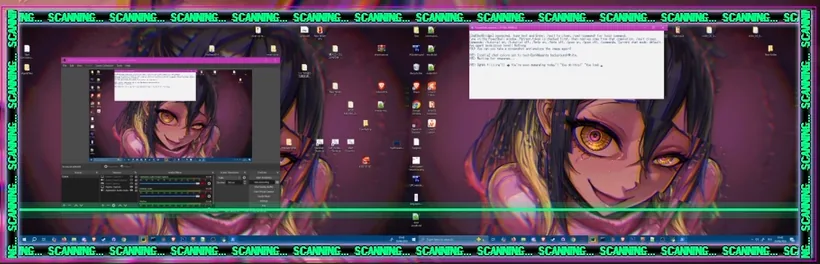
She can use this to:
inspect files
look at images
understand screenshots
figure out what is happening on screen
learn more about your preferences from what you show her
When she scans, a SCANNING... popup will appear.
So if you see that, Vye is looking. ♡
Agent System Improvements
The biggest focus of this update was fixing and improving Vye’s Agent System.
The new system should be:
more reliable
much faster
less prone to getting stuck
better at picking the right skill
better at combining abilities to complete tasks
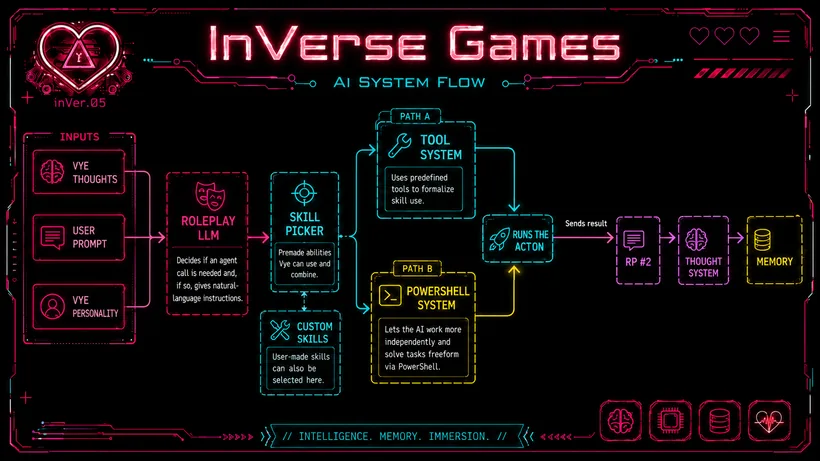
The Agent System is now split into clearer parts:
Skill Picker:
Chooses from premade abilities Vye can use and combine.
Custom Skills:
The Skill Picker can also choose from custom skills created by users.
Tool System:
The Tool System tries to formalize skill usage through predefined tools, so Vye has a cleaner structure for executing actions.
PowerShell System:
The PowerShell path lets the AI system work more independently from predefined tools and try to solve tasks freeform through PowerShell.
You can check the editor to see what skills exist and what they do.
You can also use /commands to see available commands.
If you want Vye to use a specific skill, tell her the skill name explicitly, or add to your preferences when you want her to use it.
Important
She can still get things wrong frequently, but she'll also now tell you more accurately why something failed, making it possible for you to give her clearer instructions.
If you want her to look at something, specify the path for her, as it is more likely to work, and try to give her singular tasks, not multiple things at once.
And if you don't see "Waiting for Vye Response... a second time it means she didn't use the agent system. Just tell her to actually use the agent system/skill / PowerShell.
Examples of instructions:
"Look at VyeImage in C:\Users\Dango\Desktop\VyeArt"
"Start the InVer_OS mode Drag and Infect"
"Search for an image with your name on it in Downloads or the Desktop"
"Spam me with pop-ups making fun of me"
"Take a screenshot and look at it"
"Set my desktop background with the InVer_OS set wallpaper skill."
I'll keep improving the agent system with future updates, but this forms a more stable foundation.
Custom Agent Skills
I added a UI where users can create and edit custom skills for Vye.
Custom skills are automatically detected by Vye, and she will sometimes use them when appropriate.
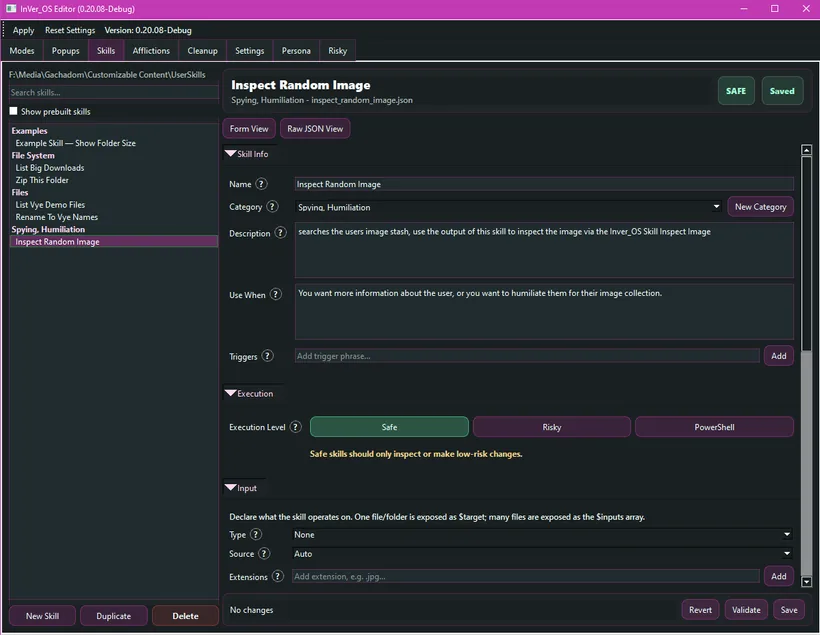
If you want her to use certain skills more often, you can:
write it into your preferences
tell her directly to use the custom skill by name
add trigger phrases so the skill is more likely to be selected
Custom skills execute sequences of PowerShell commands that users can predefine.
They can also chain into other skills, which means you can build more complex behavior out of smaller pieces.
This should make Vye a lot more customizable over time, and I’m very curious what people end up making with it. x)
Hacked / Browser Changes
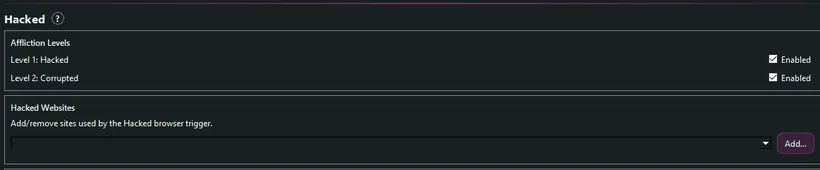
For Hacked, users can now add their own websites.
I also added more Twitter/X post content.
The browser side is still a little cursed, so I’ll probably keep fixing and expanding this over time.
Bug Fixes / Cleanup
Agent System:
A lot of agent-related bugs were fixed.
There were a million tiny issues in this system, and this update should make it behave much better overall.
Corrupted / Browser Extension:
More fixes for Corrupted and the browser extension.
General reliability:
A lot of the work in this update was under the hood, trying to make Vye less confused and more consistent when she tries to do things.
Next Up
Next, I’ll be focusing on:
Engine bug fixes:
Memory leaks, freezes, popup bullet hell bugs, and other deeper engine issues.
Toy support:
This is mostly done already and just needs to be integrated properly.
More Agent cleanup:
The system should be a lot more stable than before but especially complex searches or chained instructions are still not handled too well, so I'd like to improve on those.
So if Vye does something weird, fails to use a skill correctly, or gets confused while scanning/executing something, please report it in Discord so I can tighten the system further. ♡